Optimize the use of storage space on your drives and organize data by comparing, merging or synchronizing separate files or entire folders. The program enables quick preview of the processed content and supports filters for file types. HTML or XML reports are generated.
Merging text files is only one of the many things that Araxis Merge does well. Its main functionality is to compare text-based files and display any differences between them in a straightforward and intuitive way. Its tabbed interface allows for multiple comparisons of nearly any text-based file (Office and OpenDocument files included), binary file, and a number of image file formats. As a bonus, you can make use of its fast and efficient comparison capabilities to look for changes between two similar folders and synchronize their contents in a snap.
This is not the only file comparison tool available out there, and it’s certainly not the most affordable one. If all you’re looking for is a simple program capable of comparing to text files and of spotting all the differences, you may find Araxis Merge a bit out of your scope, and you may find some free tools on the Web that can do the job. If what you’re searching for is a software tool that can perform deep text revisions in no time, compare source files, web pages, perform pixel-by-pixel comparison between image files and byte-by-byte comparison between binary files, print out diff reports, and compare, merge, and sync entire folder trees, then you do need Araxis Merge. more
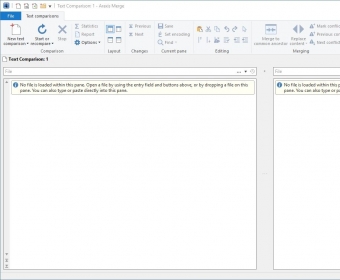
The program is suitable for all types of users and a great help for a wide array of personal and professional tasks – from writers checking different drafts of their latest work to lawyers revising contracts, and from programmers looking for subtle differences between two endless source files to data managers looking for changes in the server’s folders and subfolders. This tool has a useful feature for everyone. Text comparison benefits from a two-panel ribbon-based interface, the option to have as many comparisons as required open and just a tab away, and an intuitive way of showing all the differences found via a set of color-coded functions. All text-based files are supported, including PDF files and those created using the Microsoft Office suite of tools and OpenDocument. (In those cases, only the text will be displayed and compared, stripping them down from any layout-related feature.) It can be as thorough as you wish, allowing you to decide if whitespaces and line endings count as differences or not. All you have to do then is use your mouse to select what to merge, ignore, or delete.
If you suspect that more than one file in the folder has been modified, you can compare the entire folder tree or, for instance, all the files related to a web page to find out in a snap what has changed since your last backup. The program can look into archive files (ZIP, TAR, etc.), which allows you to compare archive files between them or against the original folder(s) used to create them.
Mainly due to its price tag, I don’t think Araxis Merge is the right tool for the occasional text comparison task, but if you happen to need this kind of functionality on a regular basis and require advanced features and comprehensive diff reports to document your work, I wouldn’t settle for less. Besides, if you decide to go for the Pro edition, you'll be able to compare three files or folders at a time instead of just two.






Comments (1)
trees, you need this. It is actually a developer's tool even more than a sys admin
tool because of its byte-for-byte comparison capability that tracks changes between
versions of the same file. I got it to try because a critical backup process had failed and
time was too short to rerun the entire backup. Merge 2008 let me get things
back on track in a quarter of the time. I STRONGLY recommend!